
eDiscovery and legal hold
Lawsuit, audit or investigation: you're ready
EMA already keeps every email and document. When a case comes up, a few clicks put everything that matters under legal hold, and your legal team searches the case on its own, with every step on record.
Watch the film
EMA Case Management
Learn how EMA provides the data for investigations and audits. We'll show you how it works in under three minutes.
Freeze it before anyone can delete it
Open a case, name the people involved and the period in question. From that moment, everything those accounts own in that period is under legal hold: emails, files, print jobs, scans and calls. Everything the case covers is safe from manual and automatic deletion, retention policies included.
Your legal team works the case on its own
The people you name on a case can enter it and search its documents, and nothing else. They don't need permission to search anywhere else, and they don't need IT to run the searches for them. At many of our customers, the legal department creates its own cases.
Every step on record
Every entry into the case, every search, every document opened and every export goes into the Audit Log under the case's ID, and stays there after the case is closed. If nobody should act alone, a case can require dual authorisation.
See the Audit Log
eDiscovery requests used to mean merging data from three systems, sometimes searching hard drives by hand, and waiting days or weeks for results. With EMA, everything sits in one place, and the speed of our searches is a genuine game-changer. Our legal department can carry out much of its research on its own.
A case in EMA
Four pages of the EMA web interface, following one case from the first form to the audit log.
One line per case
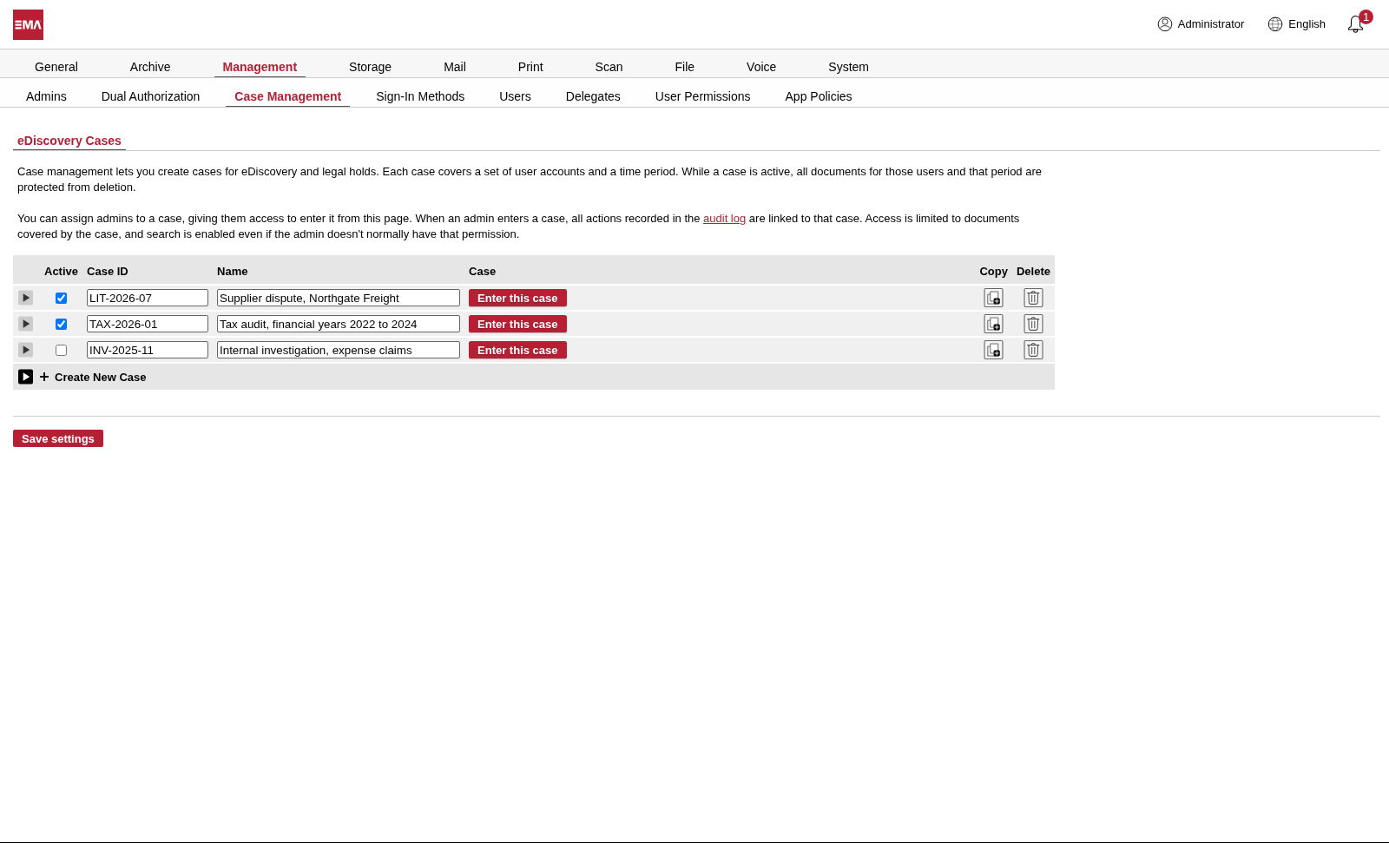
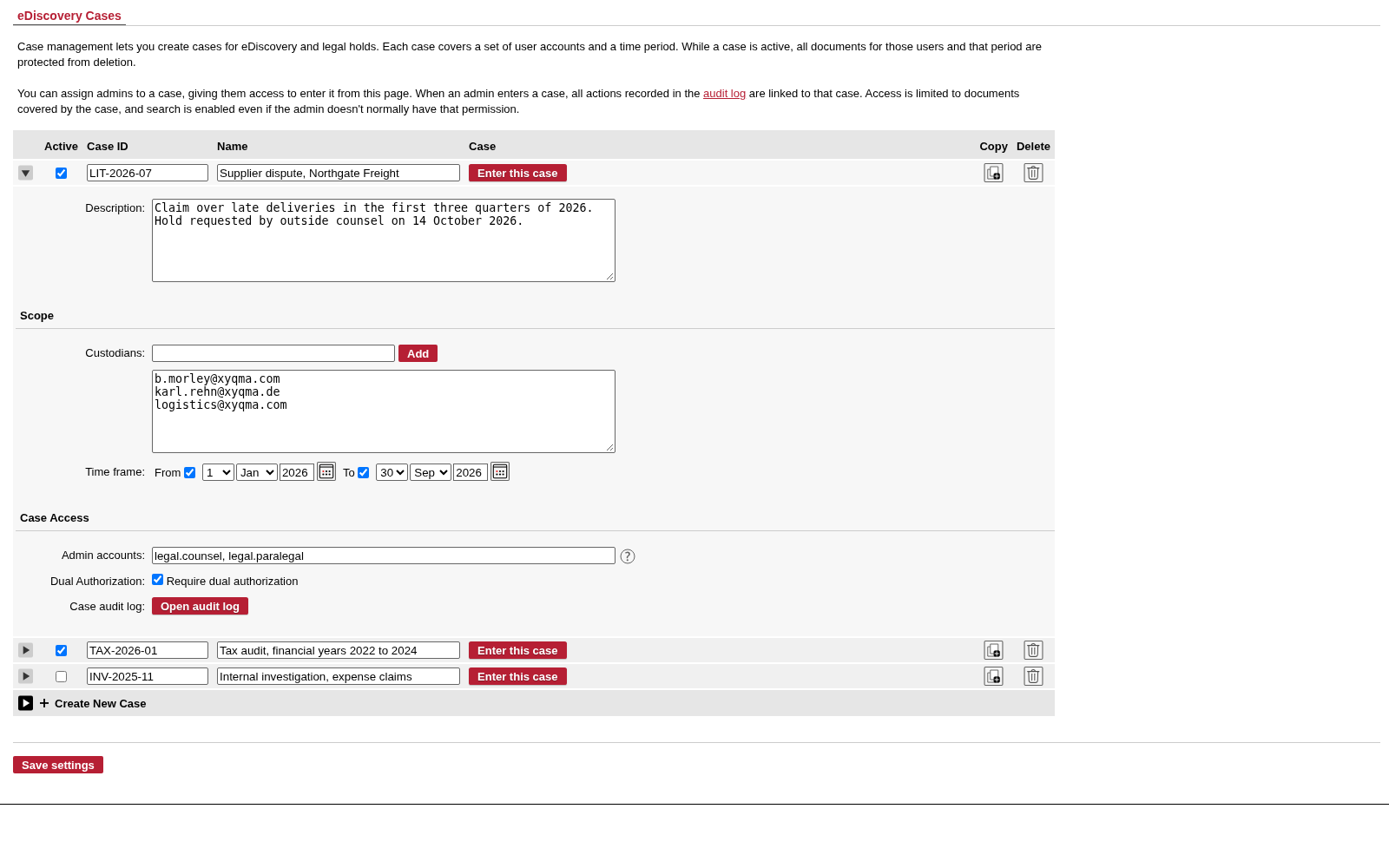
A lawsuit, a tax audit and an internal investigation side by side. Switch a case on and its hold applies at once. Switch it off when the matter is closed, and the hold lifts.
- Active: the hold applies while the case is switched on.
- Case ID and name: a lawsuit, a tax audit, an internal investigation.
- Enter this case: the admins named on the case search inside it.
Who, when, and who may look
The custodians are the user accounts involved, shared mailboxes included. The time frame narrows the hold to the period that matters. Below that, you name the admin accounts that may enter the case, and whether they need a second person to do it.
- Custodians: the accounts involved, shared mailboxes included.
- Time frame: the period the hold covers.
- Case access: who may enter the case, and whether a second admin must approve.
Inside the case
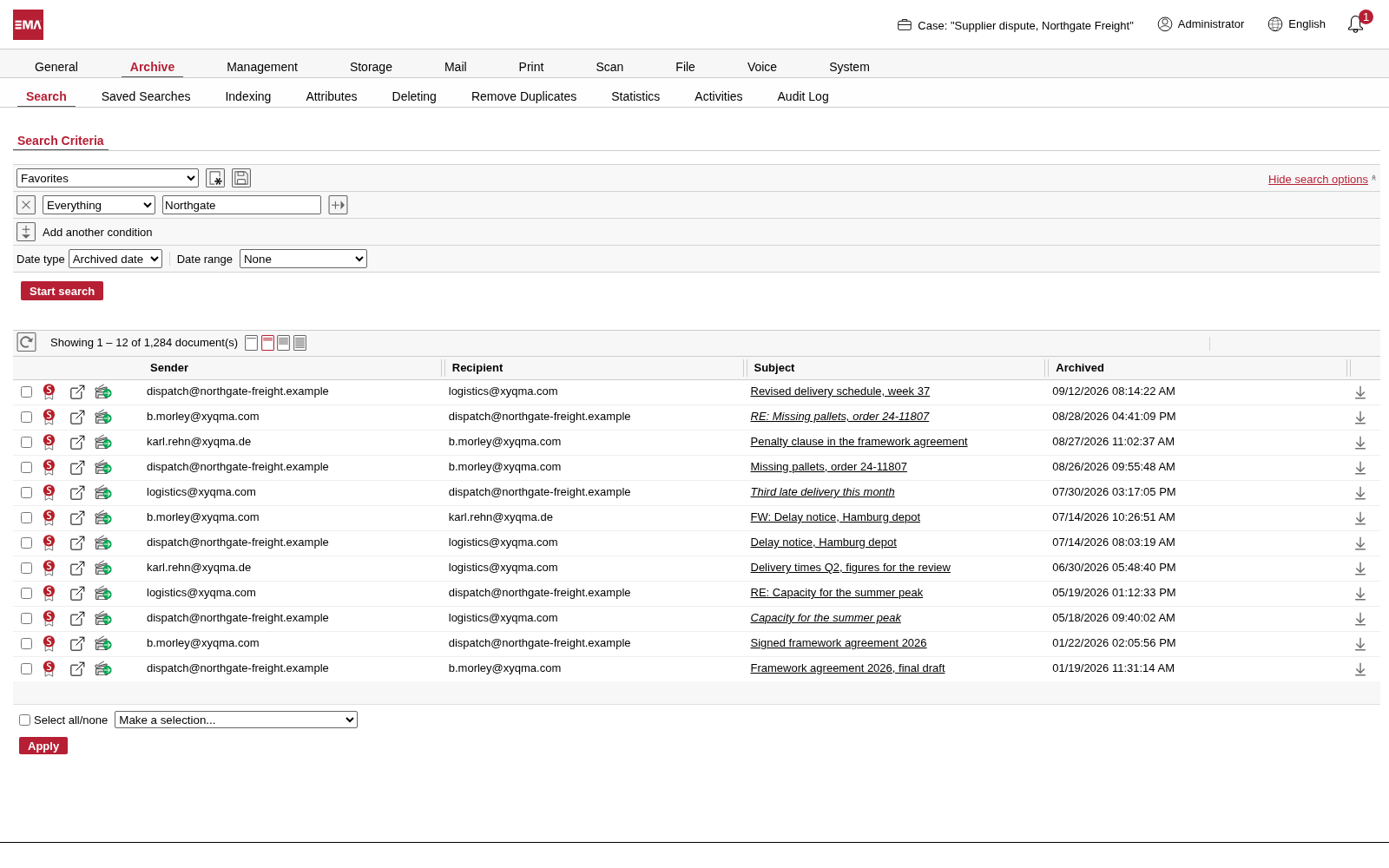
Once inside a case, the header shows its name, and every search covers only the case's documents. From the results, export what you need as a password-protected ZIP file, as PDF or as a CSV list.
- The header names the case you are in.
- Every search covers only the case's documents.
- Export the results: ZIP with a password, PDF or a CSV list.
What happened, and who did it
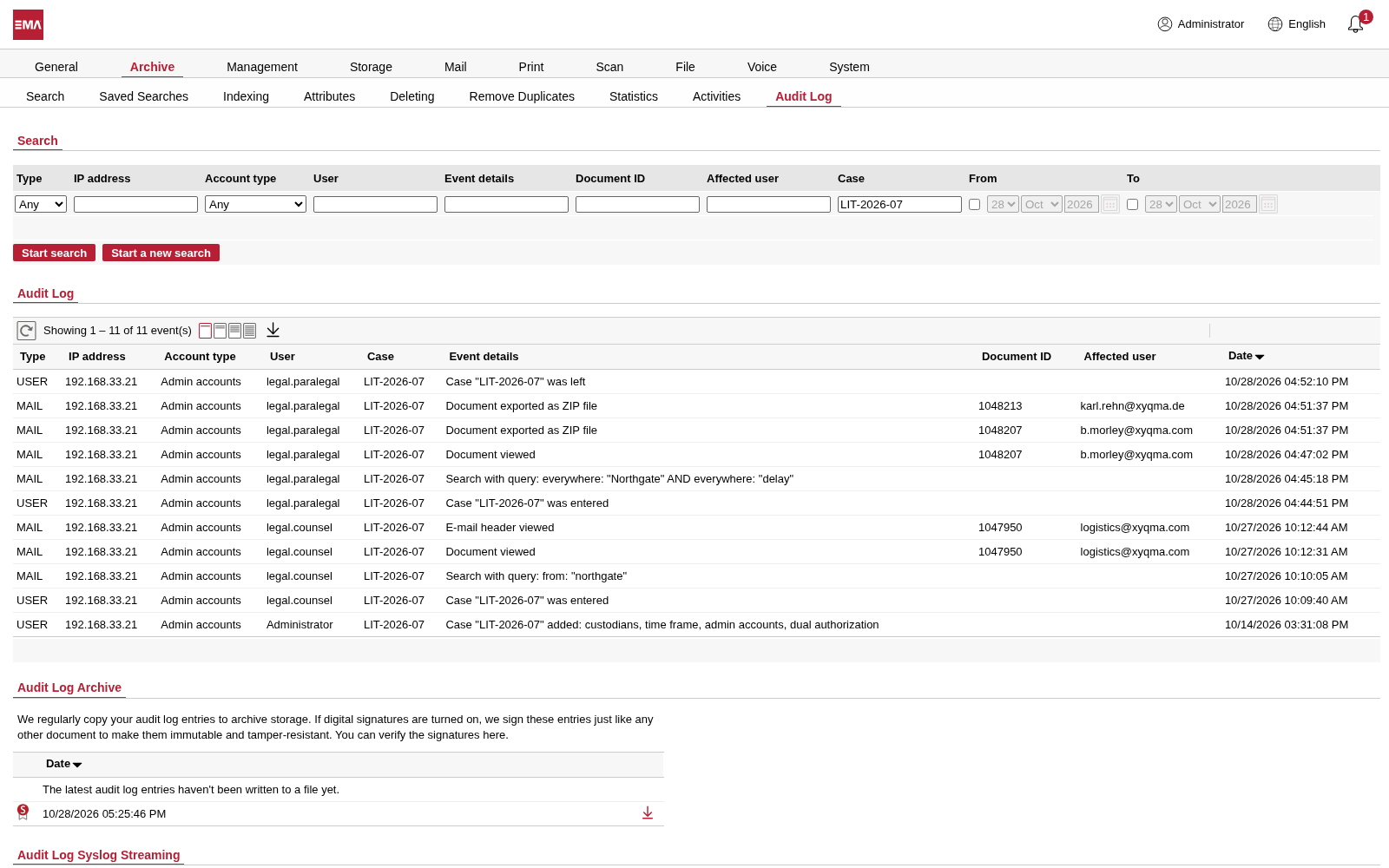
Filter the Audit Log by the case and see every step: who entered it, what they searched for, which documents they opened and what they exported. That record stays even after you delete the case.
- Filter the log by the case ID.
- Which documents were opened and exported, and whose they are.
- Who entered the case, and when.
From the letter to the hand-over
One case, five steps
- Minute 1
Open a case
The lawsuit, the tax auditor's letter or the whistleblower report arrives. You name the people and the period, and the hold is on at once.
- Minute 2
Hand it to legal
Your legal team, or your outside counsel's contact, gets access to this case and nothing more.
- Hour 1
Narrow it down
Full-text search through emails and attachments, files, scans and calls. Mark what matters with attributes such as responsive or privileged.
- Day 1
Hand it over
Export the documents as a password-protected ZIP file, as PDF, as a CSV list or as a PST file for Outlook.
- At the end
Close it
When the matter is over, switch the case off. The hold lifts, and the log of everything that happened stays.
Questions about eDiscovery
Is eDiscovery available for every EMA?
Case Management is an option for EMA Enterprise, in EMA Cloud, EMA On-Premise Flex and EMA On-Premise Classic. Every other EMA edition can still put documents on hold one by one or a whole search result at once, with the Legal hold attribute.
Can I put a hold on documents without a case?
Yes. Legal hold is a standard attribute in every edition. Set it on a single document, or on every result of a search in one go, and EMA won't delete those documents until you remove it, not even through automatic deletion. Case Management goes further: one case holds everything of the people involved for the whole period, gives your legal team access to that case and nothing else, and records every step they take under the case's ID.
What exactly does a case cover?
Everything the custodians own within the time frame: emails, files, print jobs, scans and calls. A shared mailbox can be a custodian too. Someone who only has delegated access to a mailbox is not covered by it automatically; add that mailbox to the case as a custodian of its own.
Does the GDPR not require us to delete?
Not while you need the data for a legal claim. The GDPR itself makes that exception. A case documents why you keep the data, so EMA doesn't delete it while the case is active, neither through a retention policy nor through a deletion request. Once the case is closed, the normal rules apply again.
Which formats can we hand over?
Password-protected ZIP files, PDF, CSV lists with your attributes, and PST files for Outlook. If your lawyers' review platform needs something else, talk to us. With EMA Enterprise, we can usually find a way.
Can we redact documents in EMA?
EMA doesn't change archived documents: each one stays exactly as it arrived, which is what makes it evidence. What you can do is record your review in attributes, from responsive or privileged to a note on what must be blacked out, and hide documents from view. The redaction itself happens on the copy you hand over.
Can the legal team see other people's email?
No. Inside a case they see only what the case covers: its custodians, in its time frame. Everything else in the archive stays out of reach, and everything they do inside the case is written to the Audit Log.

Be ready before the letter arrives
We'll show you a case in EMA, from the first form to the hand-over, and how it fits your edition.